TikTok Shop is committed to maintaining a secure and trustworthy environment for all users, sellers, creators, and customers alike. One of the key ways the platform ensures this integrity is by protecting intellectual property rights (IPR).
If your listing or content has been flagged for potential IPR infringement, don’t panic. If you believe the notice was issued by mistake, you have the right to appeal through TikTok Shop’s official process.
This guide explains how to appeal IPR violations, the documents required for each violation type, and what to expect during the appeal review.

How to File an Appeal for IPR Violations on TikTok Shop
If you’ve received an intellectual property rights (IPR) violation notice on TikTok Shop but believe it was issued in error, you can file an appeal to have your case reviewed. The steps are straightforward but differ slightly for sellers and creators.
For Sellers
If you’re a seller operating through TikTok Shop Seller Center, follow these steps:
-
Log in to your TikTok Shop Seller Center.
-
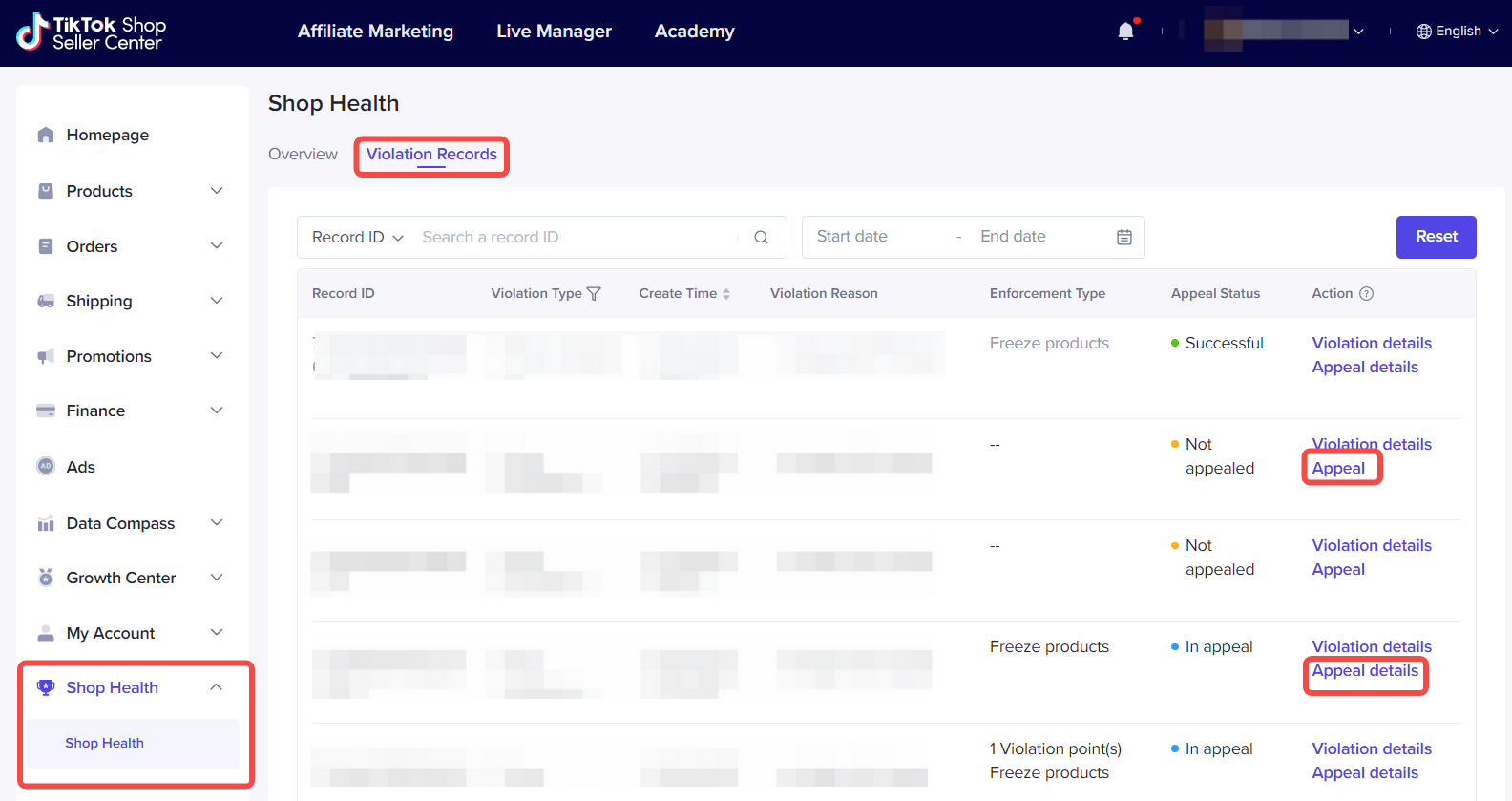
Go to Shop Health → Violation Records.
-
Find the specific violation and click Appeal beside it.
-
Upload the required supporting documents that prove your product or listing does not infringe on any intellectual property rights.
-
Once submitted, you can track your appeal status under Appeal Details.
Appeal deadlines for sellers:
-
You can submit up to two appeals for each violation.
-
The first appeal must be filed within 30 calendar days from the date of the violation notice.
-
If the first appeal is rejected, you may file a second appeal within 15 calendar days of the rejection notice.
For Creators
If you’re a creator selling through TikTok Shop’s affiliate or creator program, you’ll need to appeal from your Account Standing page. Here’s how:
-
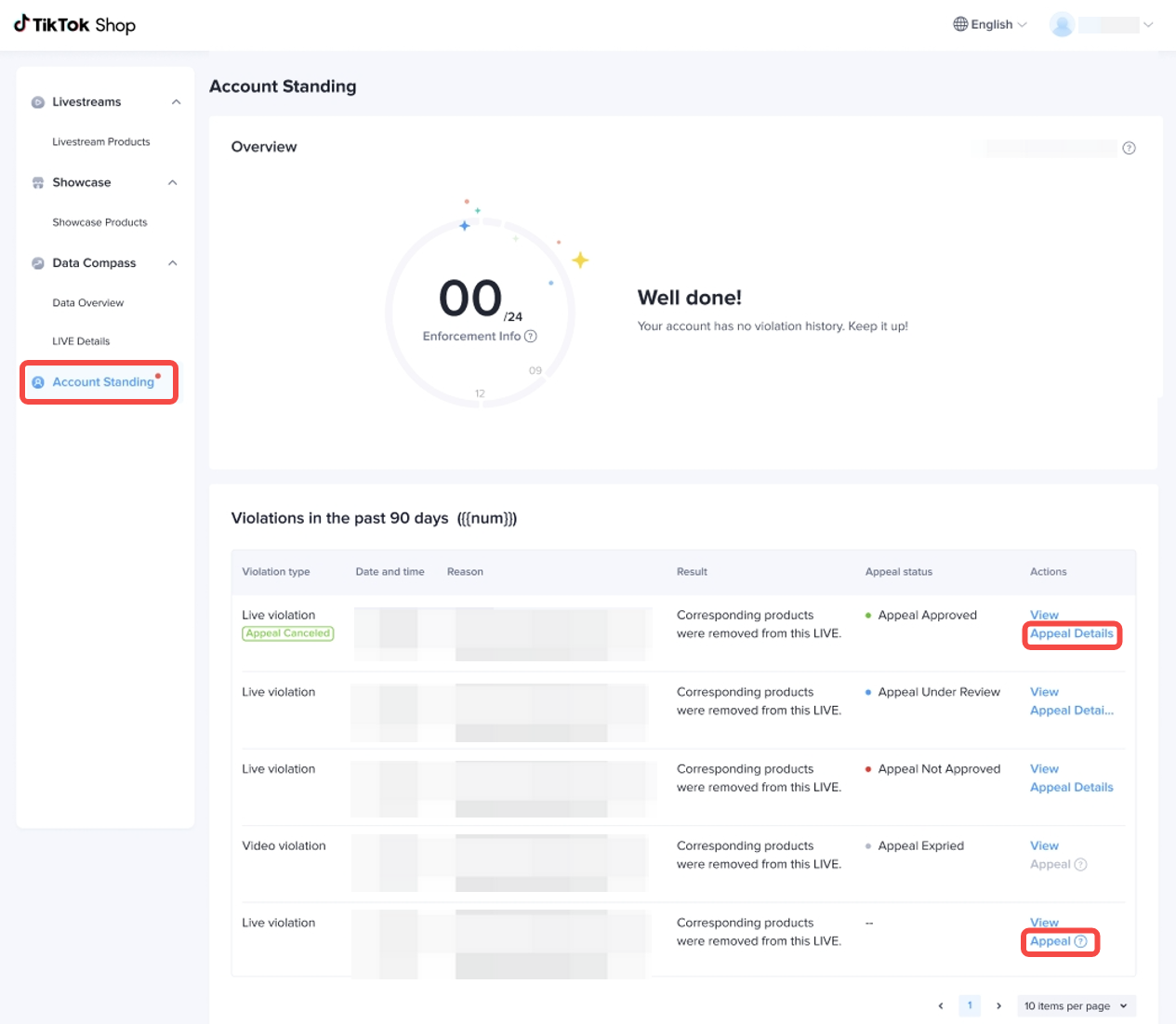
Log in to your TikTok Shop Account Standing page.
-
Go to Account Standing → Violation Details.
-
Locate the violation you want to appeal and click Appeal.
-
Upload the necessary supporting documents that verify your rights to use the reported intellectual property.
-
Monitor the progress of your appeal under Appeal Details.
Appeal deadline for creators: You can file one appeal per violation, and it must be submitted within 30 calendar days from the violation notification date.
Note: Late appeals will not be accepted, so it’s important to act quickly once you receive a violation notice.
Documents Required for Different Violation Types
When you submit an appeal for an Intellectual Property Rights (IPR) violation, TikTok Shop requires clear and relevant supporting documents to verify your claim. These documents help the platform determine whether your listing or content was wrongly flagged.
The type of documents you need depends on the nature of the violation, whether it involves a trademark, copyright, design, or patent issue. Below is a breakdown of the required documentation for each category.
1. Trademark Violations
Trademark violations occur when a product listing is reported for using another brand’s name, logo, or registered mark without proper authorisation. There are three common types:
(a) Trademark Counterfeit
This refers to selling or promoting a fake or unauthorised version of a branded product.
To appeal, provide one of the following documents:
-
Letter of Authorisation from the trademark owner or Level 1 distributor
(must include the name of both parties, authorisation rights, validity period, and official stamp or signature) -
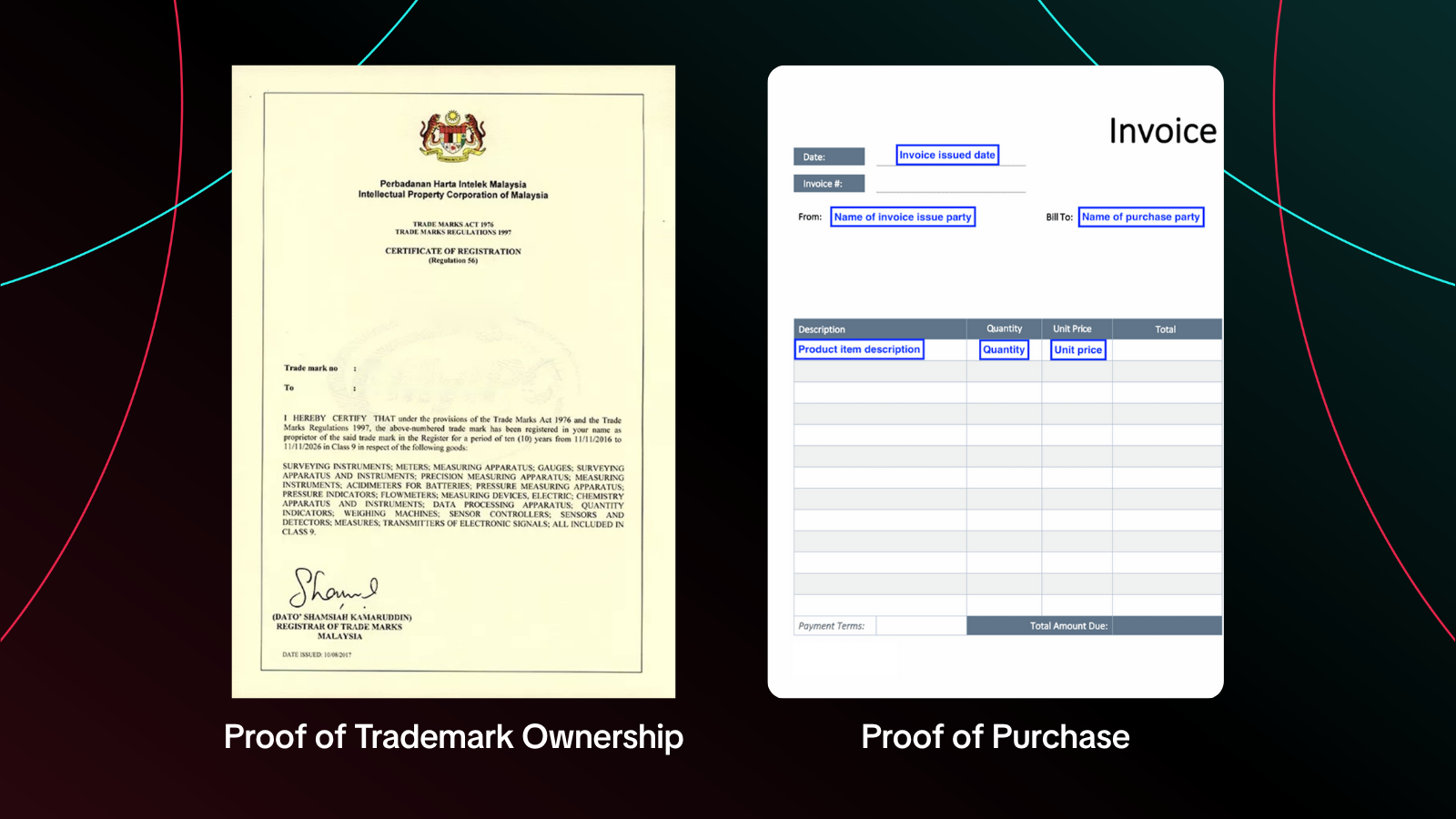
Proof of Purchase, such as an invoice or receipt from a legitimate supplier or retailer issued within the past 12 months
-
Trademark Certificate from a recognised IP authority (e.g., MyIPO, EUIPO, or WIPO)
(b) Trademark Wrong Association
This occurs when your product is associated with a trademark that belongs to a different product or brand.
To appeal, submit one of the following:
-
Letter of Authorisation
-
Trademark Certificate
(c) Trademark Overuse
This violation involves using another brand’s logo, name, or mark too prominently in your product listing or images without authorisation.
To appeal, provide:
-
Letter of Authorisation from the trademark owner or authorised distributor
2. Copyright Violations
Copyright issues relate to the unauthorised use, copying, or reproduction of protected works such as images, music, videos, designs, or software. There are several types of copyright-related violations:
(a) Copyright Piracy
This means your product is accused of being an unauthorised copy of another creator’s work.
Provide one of the following:
-
Letter of Authorisation
-
Proof of Purchase
(b) Copyright Unlawful Access
This happens when your product allegedly provides access to copyrighted material (e.g., digital subscriptions, software) without permission.
Provide:
-
Letter of Authorisation
(c) Copyright Unlawful Reproduction
This involves the reproduction or resale of items containing copyrighted material without authorisation.
Provide one or more of the following:
-
Letter of Authorisation
-
Proof of Purchase
-
Proof of Prior Sales or Prior Use (to show you used or sold the content before the complaint)
(d) Copyright Content Infringement
This type occurs when your listing content (such as images or videos) allegedly uses copyrighted material without consent.
Provide one or more of the following:
-
Letter of Authorisation
-
Proof of Prior Sales or Prior Use
-
Illustration of Differences, clearly showing how your content differs from the copyrighted work in question
3. Design and Patent Violations
Design and patent violations are more technical, as they involve registered designs or patented features that another party claims you have copied or used without approval.
(a) Design Infringement
This violation means your product allegedly copies or closely resembles another’s registered design.
Provide one or more of the following:
-
Letter of Authorisation from the registered design owner or distributor
-
Illustration of Differences, showing comparisons between your product and the registered design
-
Any additional supporting materials that prove your product is original or non-infringing
(b) Patent Infringement
This occurs when your product is accused of violating a registered patent, often related to a specific technology or feature.
Provide one or more of the following:
-
Letter of Authorisation from the patent owner or authorised distributor
-
Illustration of Differences, explaining how your product differs in function or design from the patented one
-
Any other supporting evidence proving non-infringement
What Happens After You Submit
Once you’ve submitted your appeal, TikTok Shop will review the provided documents to determine whether the violation or penalty should be lifted.
Possible Results:
-
Successful Appeal: The penalty will be revoked, and any withdrawn privileges such as product listings or account features will be restored.
-
Unsuccessful Appeal: The penalty will remain in place, and restricted privileges will stay withdrawn.
TikTok Shop will notify you of the outcome once the review is complete.
Common Reasons Appeals Get Rejected
Many appeals fail due to missing or invalid evidence. Before submitting, double-check that everything is accurate and complete. Common rejection reasons include:
-
Missing Supporting Documents: essential evidence not provided.
-
Unclear or Illegible Evidence: poor image quality or incomplete files.
-
Irrelevant or Invalid Materials: unrelated documents or expired authorizations.
-
Valid Initial Rejection: your previous appeal was correctly denied, and no new evidence was added.
Final Advice
Filing an appeal for IPR violations on TikTok Shop can be a meticulous process, but with the right preparation, it’s entirely manageable. For sellers managing multiple stores, keeping track of listings, inventory, and appeal documents can be challenging. BigSeller simplifies this process with a centralised, automated system that supports Shopee, Lazada, TikTok Shop, and more. From product sourcing to order management and stock synchronisation, it helps you stay organised and compliant across all platforms, all for free.
Start streamlining your e-commerce workflow today with BigSeller, the officially recommended ERP by TikTok and Shopee’s Preferred Partner.