How to Set Up Lazada Same Day / Instant Delivery for Sellers in Klang Valley
Erra18 Dec 2025 09:23ENCopy link & title
Here’s a step-by-step guide to enable this service for your shop.

Step 1: Access Your Account Settings
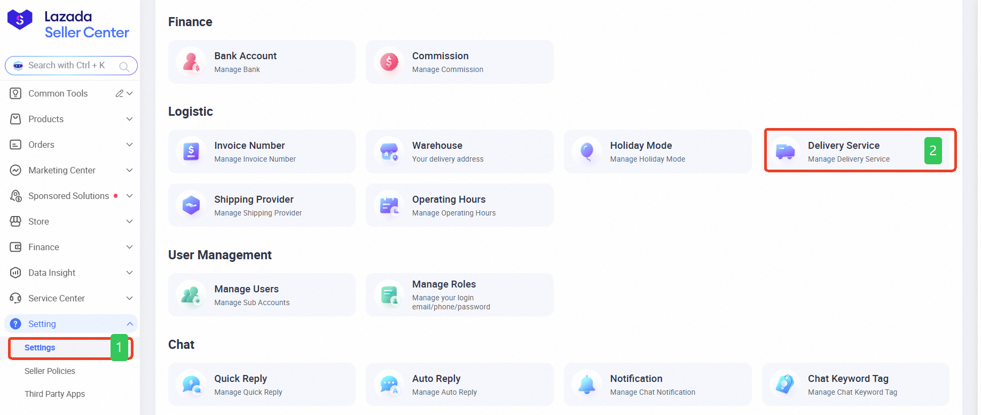
First, log in to your Lazada Seller Center account. From your dashboard, navigate to Account > Settings.
Step 2: Choose Delivery Service
Once in the settings menu, select Delivery Service. Here, you will see all the delivery methods Lazada offers: standard, express, and instant delivery. This is where you start customising how your products reach buyers, based on speed and coverage.
Step 3: Toggle Instant Delivery
Look for the Instant toggle and switch it on to enable instant delivery, or off to disable it.
If you don’t see the instant delivery option, it may be because your warehouse is not in an area covered by Lazada’s instant delivery service. Lazada only supports this for selected regions.
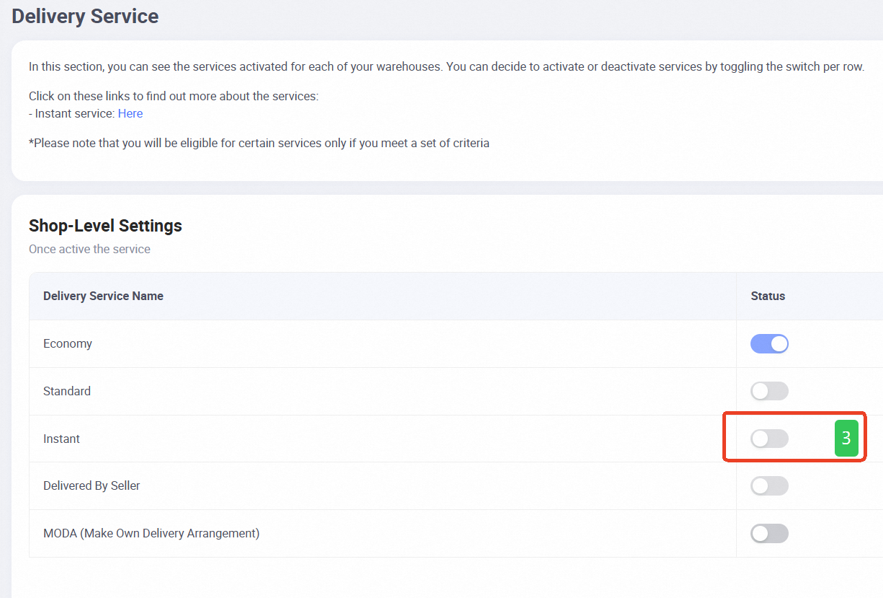
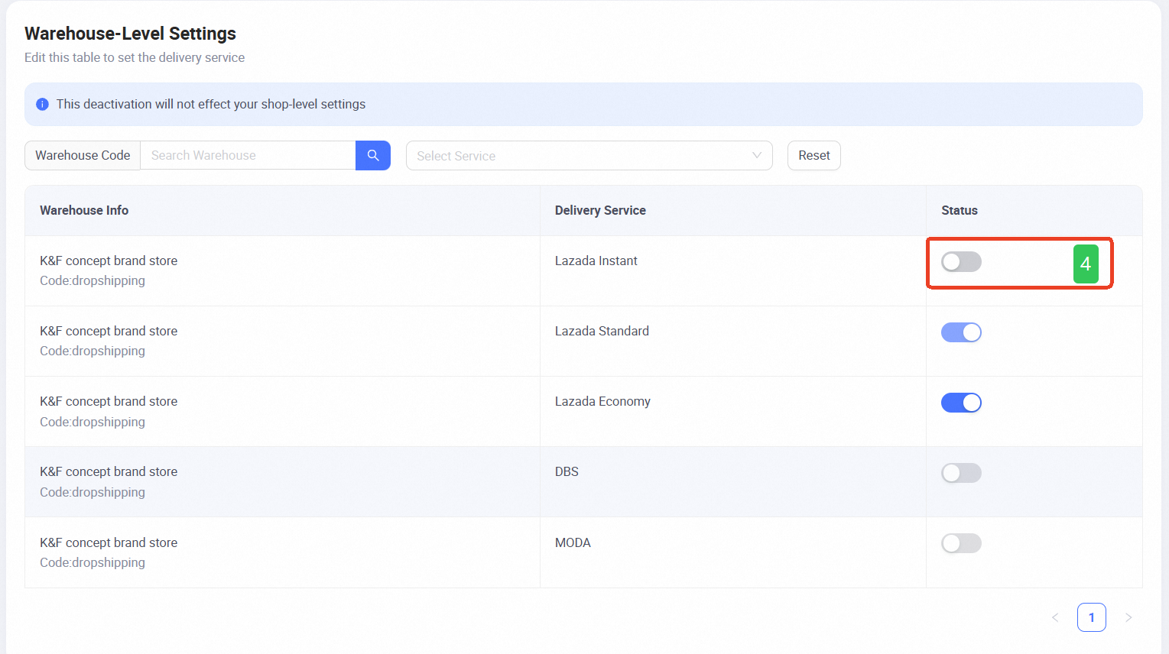
Step 4: Configure Warehouse-Level Settings
While still on the delivery settings page, scroll down to Warehouse-Level Settings. Here, you can enable or disable instant delivery for each of your warehouses individually.
Important: Instant delivery is area-specific. If your warehouse is outside the supported regions, the instant delivery toggle will not appear for that warehouse.
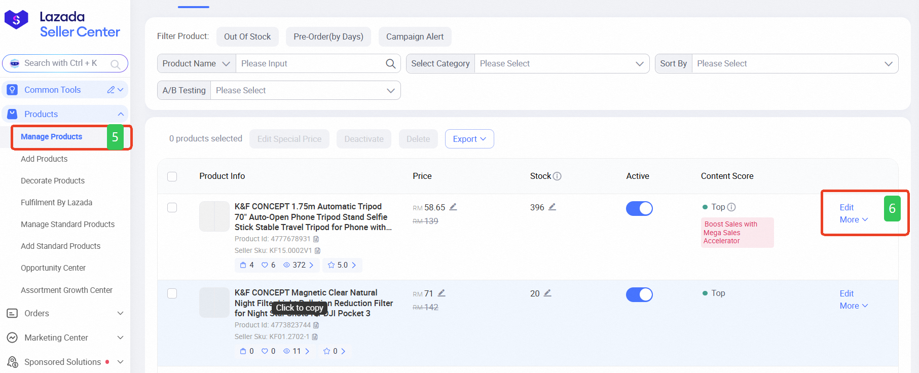
Step 5: Update Your Product Listing
After setting instant delivery at both the shop and warehouse level, go to your Product Page. This ensures the service is applied to individual products correctly.
Step 6: Edit Product
Select the product you want to offer instant delivery for and click Edit. This opens the product settings where you can configure delivery options specific to that SKU.
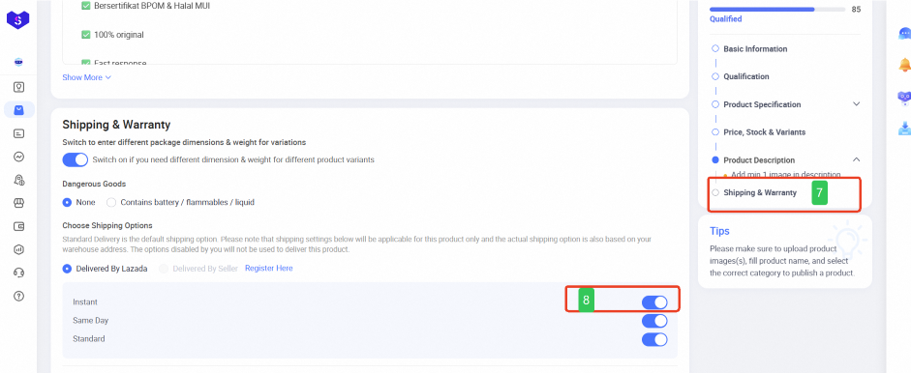
Step 7: Adjust Delivery Service for Product
Scroll down to the Delivery Service section. Toggle Instant Delivery on or off for that particular product. This ensures that buyers see the instant delivery option only for eligible items.
Step 8: Save Changes
Submit your changes to ensure the instant delivery option is active. Buyers will now see the instant delivery option when they view this product in the Lazada app.
Key Reminder for Sellers
To make instant delivery visible to buyers, the service must be enabled at all three levels:
-
Shop-level toggle
-
Warehouse-level toggle
-
Product-level (SKU) toggle
Failing to enable it at any one level will prevent buyers from seeing the instant delivery option at checkout.
For sellers who want to understand coverage areas, eligibility rules, and how Instant Delivery works in practice, you can also refer to our related article: Lazada Malaysia Instant Delivery Service Now Available in Klang Valley.
Managing Instant Delivery Without Slowing Down
Lazada Same Day / Instant Delivery leaves very little room for delays. Orders need to be identified quickly, packed accurately, and marked RTS on time, often within a tight morning window. When order volume increases, handling this manually across different pages in Seller Center can easily lead to missed cut-offs or packing mistakes.
BigSeller helps Lazada sellers keep Instant Delivery orders moving by syncing orders in real time, grouping them for faster processing, and supporting batch printing of airway bills. Barcode-based packing and stock checks reduce fulfilment errors, while real-time inventory sync helps prevent overselling that could trigger cancellations.
Try BigSeller for free today and see how it supports faster Lazada Instant Delivery fulfilment without adding extra steps to your daily workflow.
(All information in this guide is based on Lazada Malaysia Help Center)