How to Maintain High Chat Performance on TikTok Shop During Peak Seasons
Erra03 Mar 2026 03:25ENCopy link & title
As a seller, you already know this, when the festive season comes, your chat box doesn’t rest.
CNY, Ramadan, Raya, Deepavali, Christmas… the orders increase, but so do the questions.
“Can I receive this before Raya?”
“Is this ready stock?”
“Why hasn't my parcel moved?”
During peak season, chat performance is not just about being polite. It directly affects your store rating, campaign eligibility, and even your access to growth tools.
So let's break this down properly!

Why Chat Performance Matters
Many TikTok Shop sellers focus heavily on pricing, ads, affiliates, and content. But forget that communication is part of the store rating system.
When your chat performance is strong, you can:
-
Improve customer satisfaction (which leads to repeat buyers)
-
Maintain a healthier Store Rating
-
Increase chances of joining campaigns and Flash Sales
-
Qualify for programmes like Mall or Star Shop
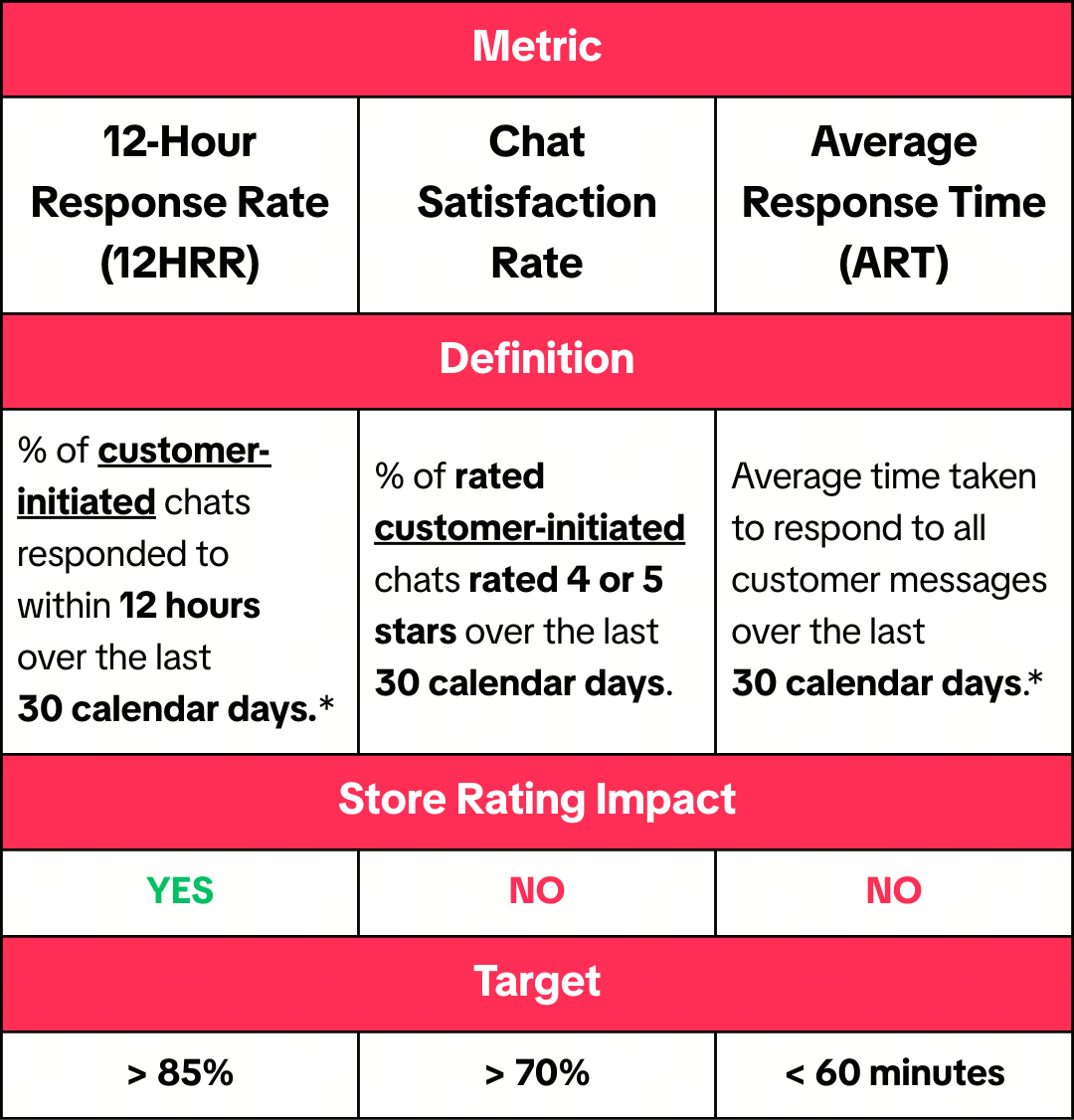
The 3 TikTok Shop Chat Metrics You Must Watch
There are three main communication metrics TikTok Shop sellers should care about.
1. 12-Hour Response Rate (12HRR)
12HRR is the percentage of customer-initiated chats you reply to within 12 hours (measured over the last 30 days).
This is the most critical metric. If 100 customers message you this month, and you reply to 88 of them within 12 hours, your 12HRR is 88%. That’s safe.
But missing replies because you're too busy packing orders can easily pull this number down.
2. Chat Satisfaction Rate
Chat Satisfaction Rate is the percentage of rated chats that received 4 or 5 stars.
It doesn’t directly impact store rating, but low satisfaction usually means poor service and that eventually shows up somewhere else.
3. Average Response Time (ART)
ART is the average time you take to reply to messages.
The platform target says under 60 minutes. Realistically, top sellers aim for within 1–2 hours, especially during peak campaigns.
If a buyer asks at 10am whether the item can arrive before Raya, and you reply at 8pm… chances are they already bought from another seller.
What Won’t Affect Your TikTok Shop Metrics?
These chats are excluded:
-
Chats received while Holiday Mode is activated
-
Chats initiated by you (including broadcast messages)
-
Chats fully handled by automated replies and FAQs
-
Chats from customers you blocked
So yes, using automation properly will not harm your performance.
New From April 2026: Transfer to Customer Service or LSP
Starting April 2026, buyers may see options to:
-
Transfer to TikTok Shop Customer Service
-
Contact Logistics Service Provider (LSP)
This usually applies to issues like:
-
Parcel stuck
-
Tracking problems
-
Refund policy clarification
If a buyer taps the transfer option:
-
It still counts toward your communication metrics (so select it promptly).
-
After transfer, messages handled by TikTok Shop or the logistics provider won’t affect your metrics.
This helps during massive sale periods when delivery-related chats spike.
How to Actually Improve Your TikTok Shop Chat Metrics
Let’s talk about practical steps.
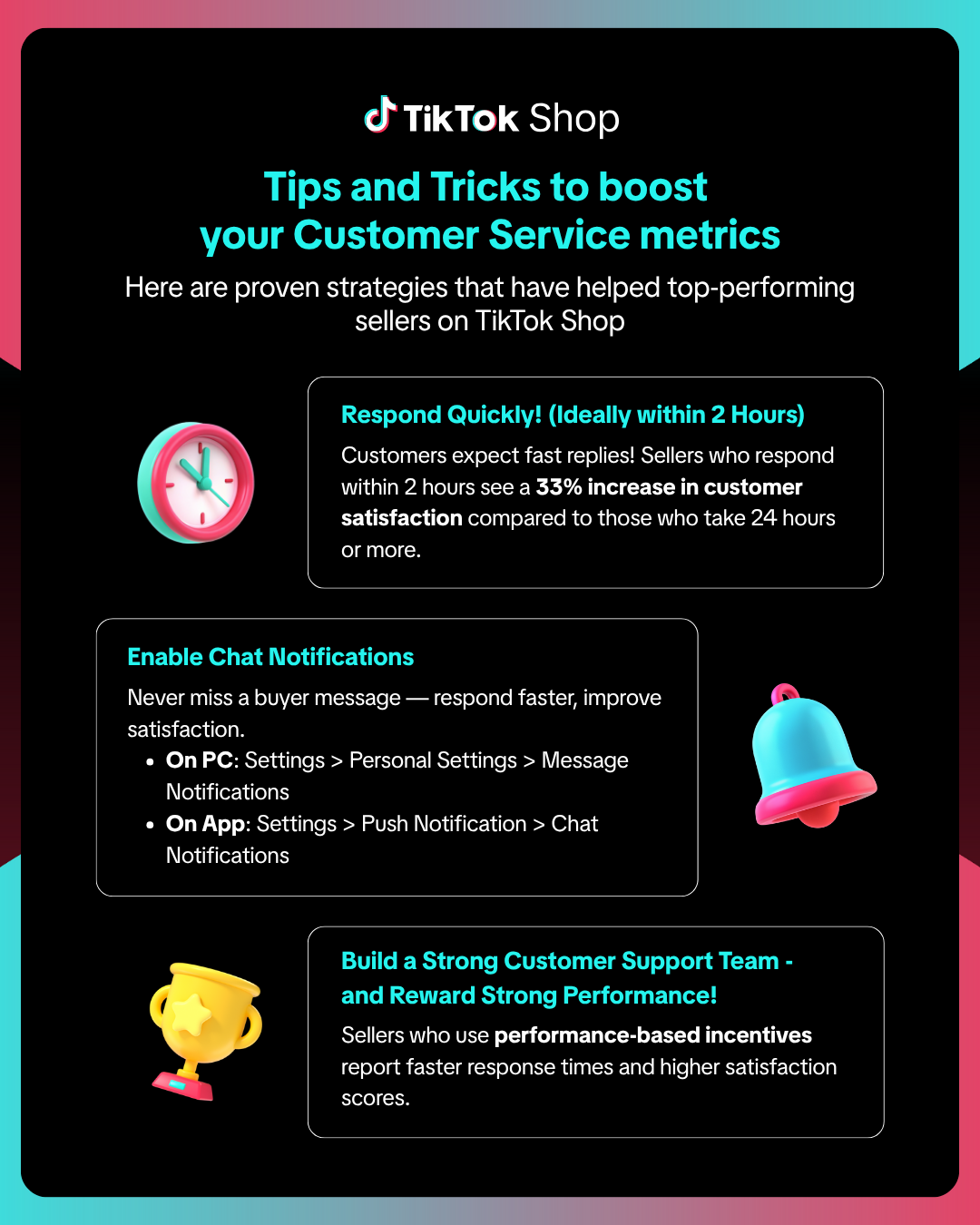
1. Reply Fast, Especially During Festive Cut-Off Periods
During Ramadan or CNY week, buyers are anxious about delivery deadlines.
If you can reply within 2 hours, you’re already ahead of many sellers.
Sometimes it’s not about writing a long explanation. Even a simple:
“Hi, yes, if you order today before 3pm, we can ship out today. Should reach before Raya.”
That alone can secure the sale.
2. Turn On Notifications (Don’t Rely on Memory)
On PC:
Settings → Personal Settings → Message Notifications
On App:
Settings → Push Notification → Chat Notifications
During 11.11 midnight launch or flash sales, this is crucial. Missing one chat can hurt your 12HRR.
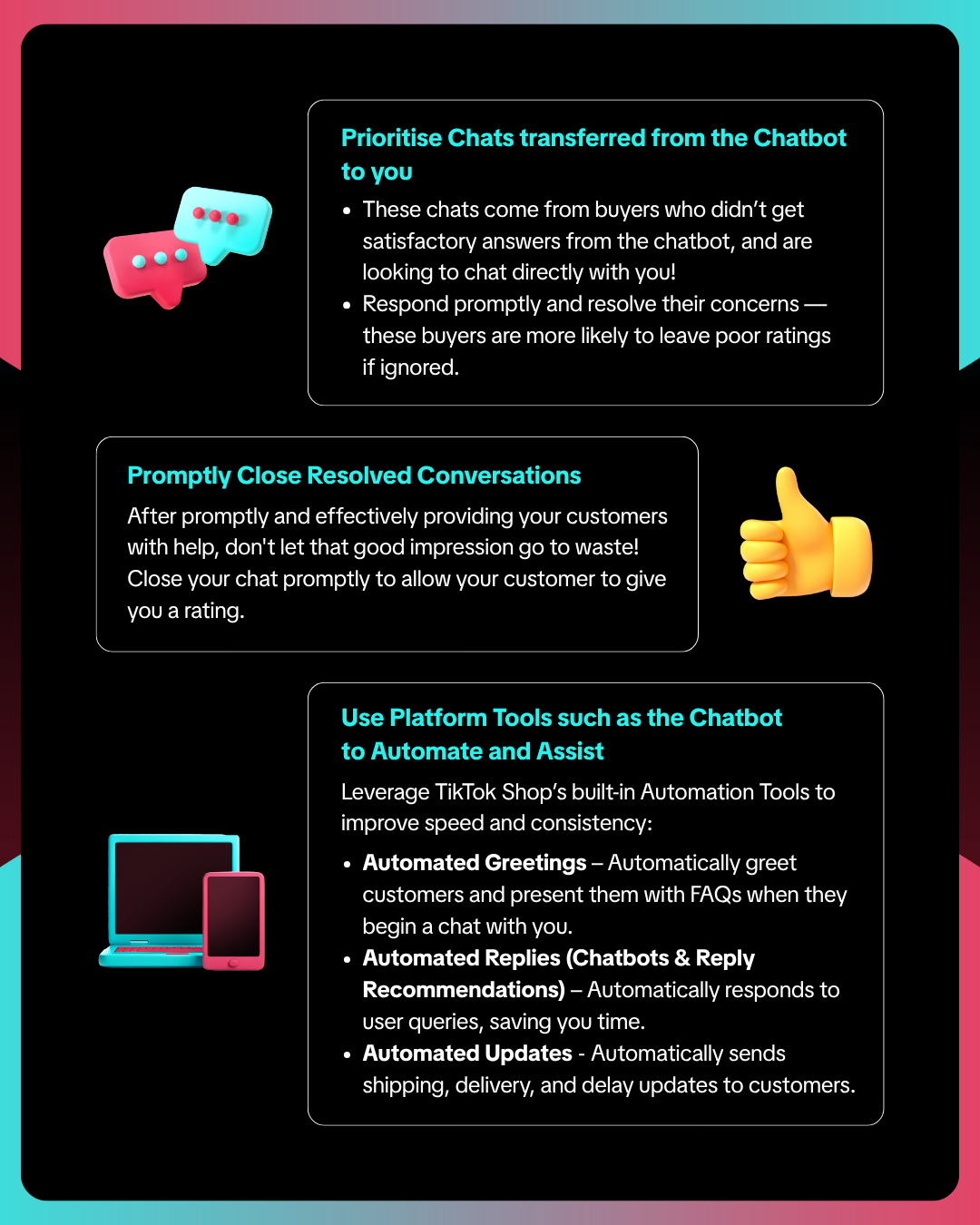
3. Use Automation, But Don’t Depend on It 100%
Automation helps a lot during peak seasons:
-
Auto greeting with FAQ
-
Auto replies for common questions
-
Auto shipping updates
For example during Raya:
“Hi! For Raya delivery before 9 March, please place an order before 2 March. Thank you!”
This reduces repetitive questions.
But if a buyer requests to speak to a human after chatbot interaction, prioritise that chat. Usually they’re confused or frustrated.
Ignoring these chats often leads to poor ratings.
4. Close Resolved Chats Properly
After solving an issue, don’t just disappear.
Confirm:
“Is there anything else I can help you with?”
Once confirmed, close the chat.
When you close chats properly, buyers are more likely to leave ratings and good ratings improve your satisfaction score.
5. If You’re Going Away, Use Holiday Mode
If you’ll be away for some time, activate Holiday Mode.
When Holiday Mode is on:
-
Shop temporarily closes
-
Buyers are informed
-
Your customer service performance is not assessed
Better to close properly than let unread messages damage your metrics.
What Counts as a Message on TikTok Shop?
Everything.
Text, stickers, emojis, photos, order cards, product cards.
Yes, even a single “?” or “👀” needs a reply.
The system counts customer-initiated messages, so don’t ignore small ones.
Manage Peak Seasons Without Losing Control
During festivities seasons and big campaigns, things move fast. Orders increase, chats increase, stock moves quickly, and mistakes happen when everything is handled separately.
This is why many growing sellers switch to BigSeller.
Instead of managing products on one tab, orders on another, stock in Excel, and finance somewhere else, BigSeller centralises everything in one system:
-
Product listing across multiple platforms
-
Order sync and batch processing
-
Real-time inventory updates to prevent overselling
-
Warehouse picking and barcode scanning
-
Campaign and promotion management
-
Sales and profit reports in one dashboard
It supports major platforms including Shopee, Lazada, and TikTok Shop, making it easier to manage multi-channel sales without chaos during peak seasons.
Try BigSeller for free today and claim the 7-Day VIP Trial Coupon to unlock advanced features and see how much smoother your daily operations can be.
Source: